Offline Music Player: Play MP3
- 4.5
- Rating
- 50.00M
- Installs
- Free
- Price

 Analysis by App-foxy
I spent time using Offline Music Player: Play MP3 as a straightforward way to listen to music already available on my phone, and its appeal became clear quite quickly: it keeps the focus on local playback instead of trying to turn the experience into a large streaming platform. For people who have their own MP3 collection, travel often, or simply want music without depending on a mobile connection, that simplicity is useful.
This is a free Music & Audio app from Dairy App & Notes & Audio Editor & Voice Recorder. It is aimed at teenagers and older users, works on Android devices running version 6.0 or later, and includes optional in-app purchases ranging from $1.99 to $39.99 per item. The app has built a substantial audience, with over 50 million installs, a 4.5 average from around 367 thousand ratings, and roughly 4.8 thousand written reviews.
How the player feels in everyday use
The first thing I noticed is that this is best understood as a personal library player, not a replacement for a subscription service. Its central job is to let me open music stored on the device and play it offline. That makes the app particularly practical when I am commuting through areas with unreliable reception, conserving mobile data, or listening somewhere that internet access is inconvenient.
You May Also Like

 Pandora - Music & Podcasts
Pandora’s Music Is Easy to Start, but Harder to Recover
Pandora’s strength is its low-effort path from a seed to a station. Its weak spot is how much confidence it asks you to place in connection, setup, and quiet recovery.

 8 Ball Pool
 Is Built on Rivalries, Rematches, and Routine
A close look at the rivalries, rematches, shared routines, and unanswered safety questions that turn a quick pool match into a persistent mobile community.

 Samsung Music
’s Quiet Strength Is Playing What You Already Own
Its reach comes less from spectacle than from dependable access to a personal library. That simplicity is both the app’s strongest retention engine and its ceiling.

 AccuWeather: Weather Radar
AccuWeather Review: A Quick, Clear Forecast for Everyday Decisions
For everyday plans, the best forecast is the one you can understand quickly. AccuWeather makes rain timing, radar, and local conditions easy to act on, with a few trade-offs.

 Hill Climb Racing
Why Hill Climb Racing Still Turns Crashes Into One More Run
A tiny car, a bumpy hill and one more upgrade: Hill Climb Racing keeps resurfacing because its simple chaos makes every near-miss feel personal.

 AliExpress - Shopping App
AliExpress Makes Global Shopping Feel Personal, but Shoppers Bear the Risk
AliExpress turns a global marketplace into a pocket-sized discovery engine. Its reach is useful, its shopping loop compelling, and its trade-offs easy to miss.
More From Our News Desk
View All News


A realistic example is a long train journey. Before leaving, I can make sure the albums or tracks I want are already on the phone. Once the journey starts, playback does not need to compete with a weak signal, repeated buffering, or a streaming account. That workflow is less glamorous than discovering music online, but it is dependable and easy to understand.
The same approach works well for a workout playlist, background music while studying, or a collection of recordings kept for regular listening. I also like the fact that an offline player encourages me to organize what I actually own instead of endlessly browsing recommendations. If your music is already stored locally, the app’s purpose is immediately clear.
There is a trade-off, though. A local player cannot automatically solve the problem of finding music to listen to. Users who expect a built-in catalog, artist discovery, radio stations, synchronized streaming libraries, or cloud-based access across several devices may find the experience limited. I would choose a streaming service for discovery and this app for direct access to a device-based collection.
Useful for a focused library, less useful for discovery
My strongest recommendation is for listeners who already have MP3 files and want a dedicated place to play them. It can also suit someone who prefers not to maintain a monthly subscription just to hear music they have already downloaded or transferred. The free entry point makes it easy to test whether its playback style fits your habits before considering any optional purchase.
I would be more cautious about recommending it to someone whose entire collection lives inside a streaming service. Downloaded tracks from many streaming platforms are normally tied to those platforms rather than behaving like ordinary files, so installing a local MP3 player does not automatically bring that library across. That distinction matters before choosing this app as a replacement.
Another practical question is where the music comes from. The app is designed around playing files that are available on the device; it is not a promise that every song can be downloaded from the internet inside the player. I would prepare the music collection separately, check that the files are visible to the phone, and then use the player for listening. That avoids the common disappointment of expecting a local tool to provide a complete music store.
Small habits that make offline playback smoother
One useful habit is to prepare a small travel selection rather than copying a disorganized archive onto the phone. I find that a clearly arranged folder or a manageable group of albums makes local playback feel much more intentional. It also reduces the time spent searching when I am already on the move.
A second tip is to test the files before leaving home. If a track is missing, stored in an unusual format, or not visible to the player, discovering that at the station or on a flight is frustrating. Playing a few songs in advance gives me a chance to correct the library while I still have access to the original files.
A third trade-off concerns storage. Offline listening avoids streaming data, but the music still occupies space on the device. I would keep the collection selective on a phone with limited storage and reserve larger archives for another device. The app is convenient because the music is local, but local also means that storage management remains the user’s responsibility.
What the current version tells me
The current version is 1.02.122.0212, and the app was released on December 29, 2021. Those details place it in the category of an established player rather than a brand-new experiment. Its large install base and strong average rating suggest that the basic offline-listening idea has connected with many Android users, although popularity alone does not guarantee that every library or phone will behave identically.
When I look at the product through that lens, the most important evolution is not a dramatic change in purpose. The app remains centered on local music playback. That consistency is valuable for existing users because a focused player does not require them to learn an entirely different service model just to listen to files they already have.
At the same time, I would avoid treating the version number as proof of a particular feature or performance improvement. A version label tells me which release is current, but it does not by itself explain every internal change. What I can judge directly is the present positioning: this is still a free offline MP3 player with optional purchases, not a full streaming ecosystem.
For someone who used an earlier release, the likely benefit of staying current is access to the maintained version rather than a guaranteed transformation of the interface. I would update normally, then check the few things that matter most to my routine: whether the music library is detected, whether playlists or playback preferences remain comfortable, and whether the app continues to behave well on my particular Android device.
How existing users should approach an update
If the app already works for you, I would not reorganize your entire music collection around assumptions about a new release. Keep your original files backed up, especially if they were transferred from an older phone or computer. A local player is only as reliable as the files it can access, and a backup protects the collection independently of the app.
I would also check the app after updating with several different types of listening: one short track, one long recording, an album with several songs, and a playlist you use frequently. This is a more useful test than opening one familiar song and assuming everything is fine. It quickly reveals whether your everyday workflow still feels natural.
For new users, the same approach helps establish a baseline. Add a small group of music first, confirm that playback is comfortable, and only then move a larger collection. This staged setup is especially sensible when the phone contains many files with inconsistent names, missing artwork, or folders created by different devices.
Where it still falls short
The biggest limitation is the boundary between offline playback and online music services. I would not install this expecting the discovery tools, synchronized catalogs, or account-based continuity that come with major streaming alternatives. Those services are better if I want to search for almost anything instantly, follow new releases, or switch between phone, tablet, and other supported devices without manually managing files.
There is also a difference between owning a well-organized collection and having a messy download folder. A local player can make playback available, but it cannot replace the work of cleaning filenames, grouping albums, removing duplicates, or deciding which files belong in a playlist. Users who dislike that kind of maintenance may prefer a service that handles library organization in the cloud.
The optional purchase model is another point to consider. The app is free to start, but in-app items are listed between $1.99 and $39.99 each. I would examine what an optional purchase changes for my own use before paying, rather than assuming that every extra is necessary for basic listening. If the free experience already covers local playback, a purchase should have a clear personal benefit.
The Teen content rating is worth noting for families, although it does not change the practical advice I would give: parents should still consider what music files a young listener has access to, because the content comes largely from the user’s own collection. The player’s usefulness depends not only on the software but also on how the device and music library are managed.
Who should choose it instead of the usual alternatives?
I would choose this app over a streaming service when my priority is predictable offline access to music files already on the phone. It is also a sensible choice when I want to avoid using mobile data for repeated listening or when I do not need recommendations. In those situations, a local player can feel faster and less distracting because there is no need to browse a huge online catalog.
I would choose a streaming alternative when discovery is the main reason I listen to music. If I want personalized suggestions, collaborative playlists, cloud synchronization, or access to music I have not downloaded, a streaming app is the more suitable tool. The two categories can coexist: one can handle exploration while this player handles a carefully selected offline collection.
I would also consider a different local player if I need a highly specialized library workflow, advanced audio controls, or a particular desktop synchronization system. This app’s strength is accessibility and directness, not necessarily serving every enthusiast’s most demanding setup. For casual and practical listening, that restraint is a benefit; for technical users, it may feel like a ceiling.
My recommendation after using it
The best reason to install it is simple: you have music files on your Android phone and want an uncomplicated way to play them without an internet connection. That use case is narrow, but it is real and still valuable. I found the app easier to justify when I treated it as a dependable local tool rather than comparing it with services built around discovery and streaming.
Its free availability lowers the risk of trying it, while the broad Android compatibility makes it accessible to people using older devices as well as newer ones. The developer, Dairy App & Notes & Audio Editor & Voice Recorder, has placed the product in a familiar, practical category, and the current release shows that it remains an active option for offline music listening.
Before installing, I would answer three questions for myself. Do I already have music files ready to play? Do I want offline listening more than online discovery? And am I comfortable managing a local collection and its storage? If the answer to all three is yes, this app is a sensible fit. If the answer is no, a streaming service or a more advanced library manager may save time.
Looking ahead, I would watch how future releases handle the balance between simplicity and extra features. The app benefits from staying easy to use, but it also needs to remain comfortable for growing music collections. I would pay attention to library handling, playlist convenience, compatibility with current Android devices, and whether optional purchases add meaningful value without distracting from basic playback.
My final view is positive but specific. I would recommend Offline Music Player: Play MP3 to a friend who wants their own downloaded music available offline, especially for travel, workouts, or everyday listening away from reliable coverage. I would not recommend it as a universal replacement for streaming. Used for the job it is designed around, it is a practical and approachable player; judged as a complete music ecosystem, it naturally leaves important needs to other apps.
FAQs for Offline Music Player: Play MP3
01How can I transfer my music files to the Offline Music Player app?
Transferring music files to the Offline Music Player is straightforward. You can connect your device to a computer via USB and move files directly to the app’s music folder. Alternatively, you can use cloud services like Google Drive or Dropbox to upload your music and download it within the app. It supports a variety of file formats, including MP3, WAV, and FLAC.
02Does the Offline Music Player app support playlists and offline playback?
Yes, the Offline Music Player app allows you to create, edit, and manage playlists easily. You can organize your music into various playlists for different moods or occasions. Additionally, the app supports offline playback, meaning you can listen to your music without an internet connection once the files are downloaded to your device.
03Is the Offline Music Player app compatible with both Android and iOS devices?
The Offline Music Player app is available for both Android and iOS platforms. You can download it from the Google Play Store for Android devices and the Apple App Store for iOS devices. Ensure your device meets the app’s compatibility requirements for a smooth experience.
04What customization options are available in the Offline Music Player app?
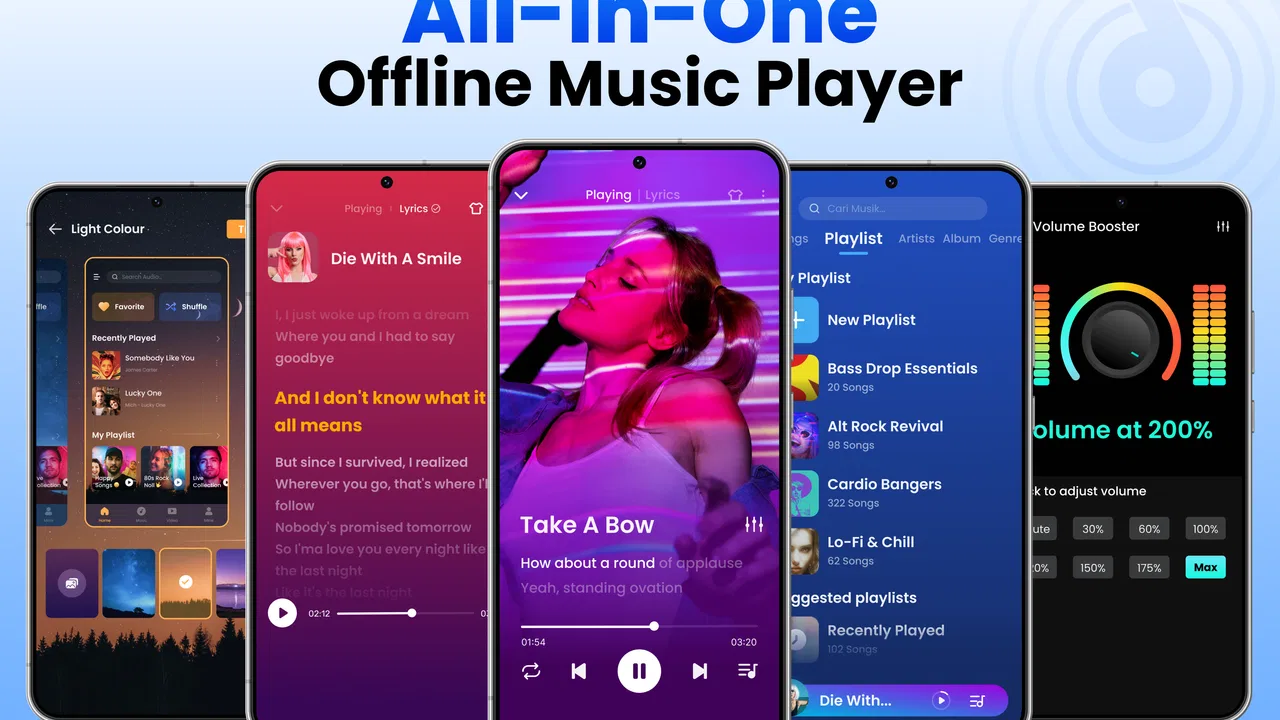
The Offline Music Player app offers extensive customization options, including equalizer settings, themes, and playback speed adjustments. You can personalize the app’s appearance with different themes and customize sound output with a built-in equalizer to suit your listening preferences. These features enhance user experience and provide greater control over audio playback.
05Are there any subscription fees or in-app purchases in the Offline Music Player app?
The Offline Music Player app is free to download and use, but it may offer in-app purchases or a premium version to unlock additional features. These may include ad-free listening, advanced equalizer options, or exclusive themes. Be sure to review any costs associated with these premium features before purchasing.
Pros
- No internet required for playback.
- Supports various audio formats.
- User-friendly interface design.
- Customizable playlists available.
- Equalizer enhances sound quality.
Cons
- Limited advanced features.
- Ads can be intrusive.
- No cloud storage integration.
- Basic design lacks flair.
- No lyric support for songs.

Offline Music Player: Play MP3
Gallery